Carel pCOweb Devices
The pCOWeb card connects the pCO system to networks with HVAC protocols on the Ethernet physical standard, such as SNMP. The implementation of the card comes from the final manufacturer of the HVAC equipment, not from a Carel standard. HVAC means heating, ventilation, and air conditioning. Each pCOweb card therefore has a different configuration and needs a different MIB.
By default, LibreNMS discovers this card as pCOweb and not as the real manufacturer. A solution for this problem exists. The solution is independent of LibreNMS. You must first configure your pCOWeb card in its admin interface.
Accessing the pCOWeb card
Log on to the configuration page of the pCOWeb card. The pCOWeb interface is not always at the IP address itself. It is often in a subdirectory. If the configuration page does not open, try <ip address>/config. The default username and password is admin/fadmin. A modern browser asks for these credentials 2 or 3 times.
Configuring the pCOweb card SNMP for LibreNMS
First configure your SNMP card in the admin interface. The SNMP tab in the configuration menu holds a System OID field and an Enterprise OID field. From these two values we defined a standard for all Carel products in LibreNMS.
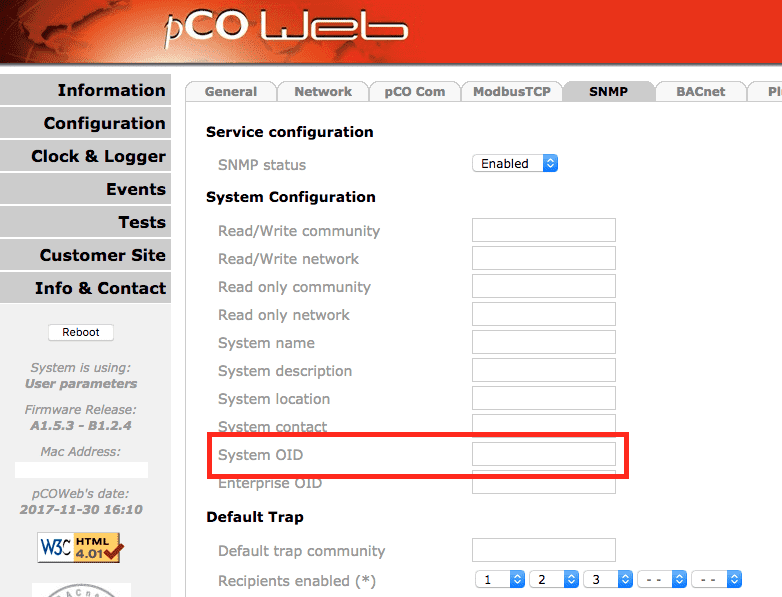
The base Carel OID is 1.3.6.1.4.1.9839. Add the Enterprise OID of the final manufacturer to this OID. The IANA enterprise numbers list holds all enterprise OIDs. This value gives specific support for the device. LibreNMS uses the value to detect the HVAC device behind the pCOWeb card.
Example for the Rittal IT Chiller that uses a pCOweb card:
- Base Carel OID : 1.3.6.1.4.1.9839
- Rittal (the manufacturer) base enterprise OID : 2606
- Adding value to identify this device in LibreNMS : 1
- Complete System OID for a Rittal Chiller using a Carel pCOweb card: 1.3.6.1.4.1.9839.2606.1
- Use 9839 as Enterprise OID
The pCOWeb card presents itself as another device. It puts the enterprise OID in the position of the vendor id in the OID.
The table below gives the values for the supported devices.
Supported devices
LibreNMS supports the devices in this table. Configure your pCOweb card with the System OID and the Enterprise OID from the table:
| Manufacturer | Description | System OID | Enterprise OID |
|---|---|---|---|
| Rittal | IT Chiller | 1.3.6.1.4.1.9839.2606.1 | 9839 |
| Rittal | LCP DX 3311 | 1.3.6.1.4.1.9839.2606.3311 | 9839.2606 |
Unsupported devices
Build the correct System OID for your SNMP card. Then start a new OS implementation. Use this new OID as the sysObjectID in the YAML definition file.